
APPLY  VISIT  GIVE

mySCC Account Foundation

SCC Logo
  • About
        • About SCC
          • Mission
          • History
          • Tuition and Fees
        • Accreditation
        • Administration
        • Assessment
        • Board of Trustees
        • Campuses
        • Campus Security
        • Facilities
        • Foundation
        • Institutional Effectiveness
          • Data Dashboard
          • Strategic Planning
          • Monitoring Reports
        • Maps
        • Office of the President
        • Organizational Charts
        • Policies
        • Right to Know
        • Shared Governance
        • State Authorization
        • Audit Reports
        • Bids
        • CARES Act Reports
        • College Budget
        • FOIA
        • Title IX
  • Academics
        • Programs of Study
        • Academic Calendar
        • Advisement & Registration
        • College Catalog
        • Course Offerings
        • Dual Credit
        • Faculty
        • Financial Aid
        • Immersive Learning
        • Learning Resource Center
        • Online Learning
        • Placement
        • Research Databases
        • Student Success Center
        • Teaching & Learning Center
        • Transfer Programs
        • TRiO Student Support Services
        • TRiO Talent Search
  • Admissions
        • Apply to SCC
        • Admission Requirements
        • Advisement & Registration
        • Course Offerings
        • Dual Credit
        • Financial Aid
        • International Students
        • Placement
        • Registrar & Records Office
        • Request Program Information
        • Student Handbook
        • Tuition and Fees
  • Students
        • Student Resources
          • Basic Needs
          • Bernie's Place
          • Bookstore
          • Clubs & Organizations
          • College Catalog
          • Maps
          • Parking Permits
          • Perkins V Grant
          • Right to Know
          • Saints Alert
          • Student Handbook
          • Shawnee Cafeteria
          • Transportation Schedule
        • Academics
          • Academic Calendar
          • Course Offerings
          • Financial Aid
          • Graduation
          • Online Learning
          • Placement
          • Programs of Study
          • Registrar & Records
          • Research Databases
        • Student Success
          • Accessibility
          • Career Services
          • Counseling
          • Learning Resource Center
          • Testing Center
          • TRiO Student Support Services
          • TRiO Talent Search
          • Tutoring
          • Writing Lab
  • Community
        • Adult Education
        • Business & Workforce
        • Career Services
        • Community Education
        • Consumer Information
        • Disc Golf
        • Driver Safety
        • Facilities
        • Fitness Centers
        • Health Services Training
        • Job Opportunities
        • Learning Resource Center
        • Musical
        • Podcasts
        • Request an Event
        • Saints News
        • Salon & Spa
        • Shawnee Cafeteria
  • Athletics
    • Baseball
    • Softball
    • Men’s Basketball
    • Women’s Basketball
    • Volleyball
    • Support Saints Athletics
    • __________________
    • Athletic Contracts
    • Athletic Manual
    • Disc Golf
    • EADA
    • GRAC
    • Fitness Centers
    • Mandatory Grade Check
    • Physical Exam Form
    • 25-26 Athletic Checklist
  • Contact Us
    • Contact Information
    • Administration
    • Employee Directory
    • Faculty
    • Technical Support

SCC Knowledge Base

For Faculty

54
  • Accessibility
    • Using Accessibility Checker in Microsoft Word
    • Google Chrome Live Captioning
  • Google Tools
    • Gmail
      • How Do I Log into my SCC Gmail?
      • Setting Up 2-Step Verification
    • Google Forms
      • How to Make a Google Form
    • Google Meet
      • Scheduling a Remote Class Session in Google Meet
    • YouTube
      • Publishing a Video to YouTube
      • Editing Video Captions in YouTube
  • Moodle
    • Getting Started
      • System Requirements
      • New Semester Tips
      • Finding Your Courses in Moodle
      • Guidelines for Instructors
      • Editing a Moodle Class
    • Course Settings
      • Course Settings
      • Making Your Course Visible to Students
    • Course Administration Tools
      • Reports
      • Using Import to Copy a Course
      • Using the Sharing Cart to Copy Individual Items
      • Using the Dates Report to Update Activity Due Dates
    • Course Organization and Layout
      • Working with Sections in a Moodle Class (Video)
      • Changing Moodle Section Labels (Video)
    • Assignments
      • Making a Turnitin Assignment
      • Making a Graded Assignment
      • Adding McGraw Hill Connect Assignments
    • Quizzes and Tests
      • Creating Quizzes – Overview
      • Making a Quiz Question
      • Making a Test
      • Importing Test Banks from ExamView
      • Special Accommodations- Creating User Overrides
      • Disable Proctorio for a Student with Accommodations
    • Grades and Grading
      • Moodle Gradebook Getting Started (Video)
      • How Grading Works
      • Adding a Grade Item
      • Making Grade Categories in Moodle Gradebook (Video)
      • Entering Grades in the Grade Book
      • Viewing Graded Activities in Moodle Gradebook (Video)
      • Weighting Grades in Moodle by Category (Video)
      • Finding and Fixing Overridden Grades
    • Forums
      • Discussion Forums Overview (Video)
      • Choosing Forum Types (Video)
      • Making a Graded Discussion Forum
      • Using the Announcements Forum
      • Setting Up Whole Forum Grading
    • Files, Pages and Links
      • Add a File to Moodle via Upload (Video)
      • Adding a Web Link
      • Open Files in Moodle with Readspeaker
    • Other Activities
      • Messaging Students
      • H5P Interactive Videos
  • mySCC
    • My Account
      • Google Authenticator Setup
    • Faculty Courses
      • Submitting Initial Progress Check / Midterm / Final Grades
      • Recording Daily Attendance
      • Setup “Email All” in Course Roster
      • Midterm Class List Submission Instructions
    • Retention Alert
      • Submitting a Retention Alert

For Staff

1
  • Moodle
    • Moodle on Mobile Devices
      • Installing the Moodle App
  • Home
  • Knowledge Base
  • For Faculty
  • mySCC
  • Faculty Courses
  • Recording Daily Attendance
View Categories

Recording Daily Attendance

< 1 min read

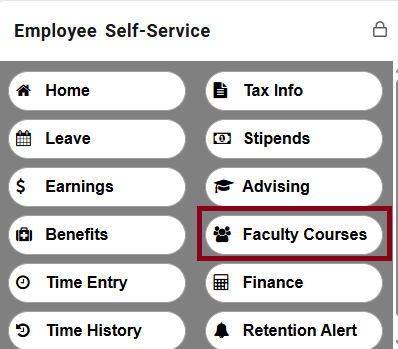
From the mySCC homepage, click on the button for Faculty Courses in the Employee Self-Service card.


The Faculty page will open with a list of your classes visible. Click on one of your classes, then click the  Attendance tab.

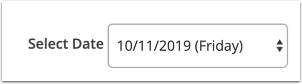
Once you are on the Attendance tab, make sure that the appropriate date appears in the Select Date field.


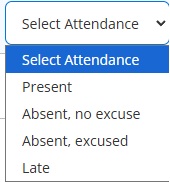
Next to each student’s name is the Select Attendance menu. Click that menu to open the dropdown. Pick the correct response in the dropdown that reflects that student’s attendance for that day. Choices are automatically saved.


If you would like to record a comment about a specific student’s attendance, click the comment icon next to the Select Attendance menu.


A comment window will open. Enter your comment (up to 50 characters) and click Save.


Still stuck? How can we help?

How can we help?

Updated on November 19, 2025
Submitting Initial Progress Check / Midterm / Final GradesSetup “Email All” in Course Roster
A-Z Index
Academic Calendar
Accessibility
Complaints
Contact SCC
Employee Directory
Financial Aid
Institutional Effectiveness
Jobs Opportunities
Knowledge Base
Moodle
mySCC
News & Events
Saints Alert
Student Handbook
Transportation


Follow us

  • tiktok
  • instagram
  • twitter
  • youtube
  • facebook
  • threads
  • spotify
  • linkedin


Mission, Values & Vision | Accreditation | Title IX | Report Fraud | Technical Support
© 2025 SHAWNEE COMMUNITY COLLEGE / 8364 SHAWNEE COLLEGE ROAD, ULLIN, IL 62992, 1-800-481-2242
This site is protected by reCAPTCHA and the Google Privacy Policy and Terms of Service apply.